UPLIFT V2 Review (2026): A Year In, Here’s What Holds Up
Category-best standing desk for a narrower buyer profile than UPLIFT's marketing implies. Frame stability at full standing height (above 45 inches) is meaningfully better than the Flexispot E7 Pro, the 7-year motor warranty is the longest in the category, and the build finish shows real attention. Right for users over 6 feet, long-term owners, and buyers who notice finish details. Skip for Flexispot E7 Pro at $549 if you're under 6 feet or budget-constrained.

Pros
- Frame stability at full standing height (best in class above 45 inches)
- 7-year motor warranty (vs 5-year Flexispot)
- build finish quality is noticeably better than $550-tier competitors
- consistent customer service quality
- maximum height range works for users up to 6'7'
Cons
- $250+ premium over Flexispot E7 Pro for marginal improvements most users won't notice
- optional add-ons inflate actual cost to $984-1,034
- 7-14 day lead time (vs Flexispot's 3-7 days)
- 60-90 minute assembly required
- 130-150 lb total weight makes relocation harder for renters
Some links on this page are affiliate links. If you buy through them I may earn a commission at no extra cost to you. I bought my UPLIFT V2 with my own money and have worked at it daily for just under a year. This is my honest take after living with it.
I bought my UPLIFT V2 because I was tired of choosing between sitting all day and a desk that didn’t fit my space. It’s expensive, there’s no getting around that, and I went back and forth before ordering. Almost a year of daily use later, it’s the rare expensive purchase I haven’t second-guessed once. It works exactly like it did on day one.
Is it actually stable?
This is the question everyone asks about a two-leg standing desk, and the honest answer is mostly yes, with one caveat. At sitting and mid height it’s solid. At full standing height there’s a little side-to-side sway if I lean on it or type hard, which is true of nearly every two-leg desk in this class. Testers measure it around 0.6 inches of sway at max height, slightly better than the FlexiSpot E7. For my work it’s a non-issue. If any wobble bothers you, UPLIFT sells a crossbar add-on and a heavier Commercial frame that both tighten it up.
What you’re actually paying for
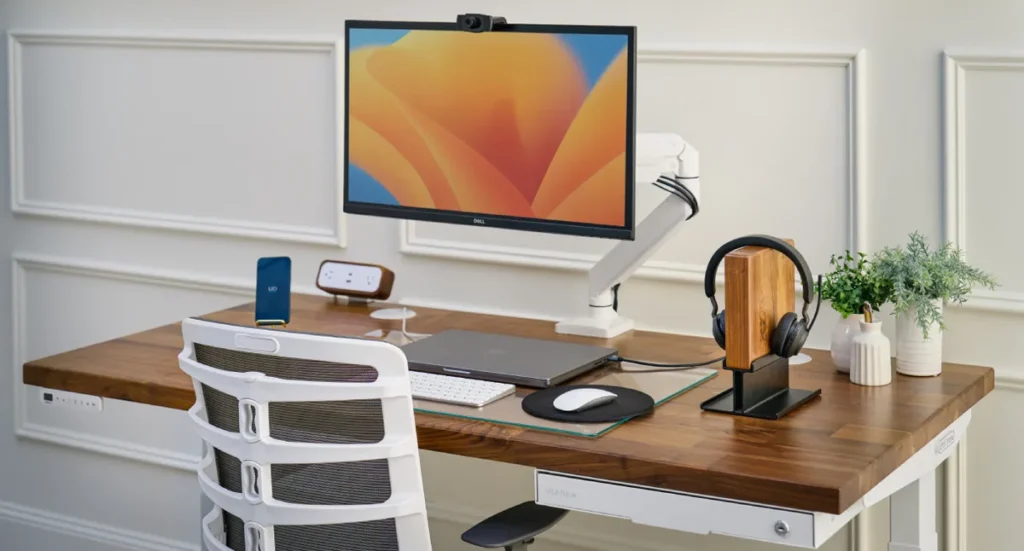
The customization is the real reason to buy UPLIFT over something cheaper. You pick from more than 20 desktop materials and sizes and a deep catalog of accessories, so the desk fits your space and your setup instead of the other way around. Nothing else in the category comes close on options. Most of the add-on catalog is skippable, though; the five accessories worth adding are in our standing desk accessories guide.
The warranty backs it up: 15 years on the frame and motor (older orders were 7), which is among the best in the category and a big part of why it feels like a buy-once desk. And the motor is quiet and smooth. Raising or lowering it doesn’t announce itself to the whole room, which matters more than I expected on calls in a home office.
The annoyances
It’s pricey. The frame and a basic top start around $549 and climb from there, well above the FlexiSpot E7 at about $479, which also goes on sale more often. And UPLIFT nickels you on a few things that arguably should be included: the base keypad is just up and down, so memory presets cost about $39 more, and the stabilizing crossbar is another $30.
Assembly is a slog. It’s a bolt-heavy build that took me well over an hour, it’s genuinely a two-person job to flip the desktop, and the included Allen wrench will leave your hand sore. Budget an afternoon and a helper. Pre-assembled desks go together in minutes, and you feel that difference on day one.
A year in
This is where it earned the price. After roughly eighteen months of daily raising and lowering, the motor is as smooth as new and nothing has failed. One thing worth flagging from long-term owners: the frame bolts can work loose over time and bring back a little wobble, so a dab of threadlocker or an occasional re-tighten keeps it solid. UPLIFT’s support also has a good reputation for replacing keypads and parts quickly, though a few owners report slower help, so it’s not universal.
Who should buy it
Buy it if you want a standing desk you’ll keep for a decade, you care about getting the exact size, top, and accessories for your space, and the price doesn’t scare you off. Look at the FlexiSpot E7 instead if you want most of the function for less and don’t need the customization. And if you load your desk heavily or can’t stand any wobble at standing height, step up to the crossbar or the Commercial frame.
Bottom line
Almost a year in, the UPLIFT V2 is the home-office purchase I’d make again without hesitating. It’s expensive and the assembly is a pain. But it’s stable where it counts and customizes to fit a space the way nothing cheaper does, and it has outlasted everything else on my desk.
If you’re furnishing a place from scratch, it shows up in our 10 best things for a first apartment guide, and we put it head to head with its main rival in the UPLIFT V2 vs Flexispot E7 Pro comparison.