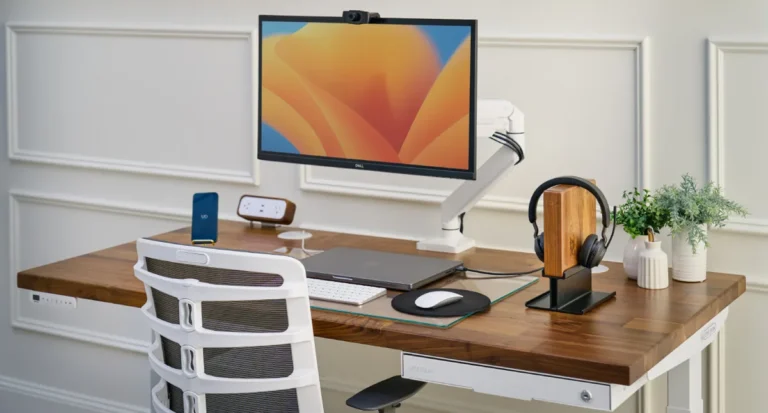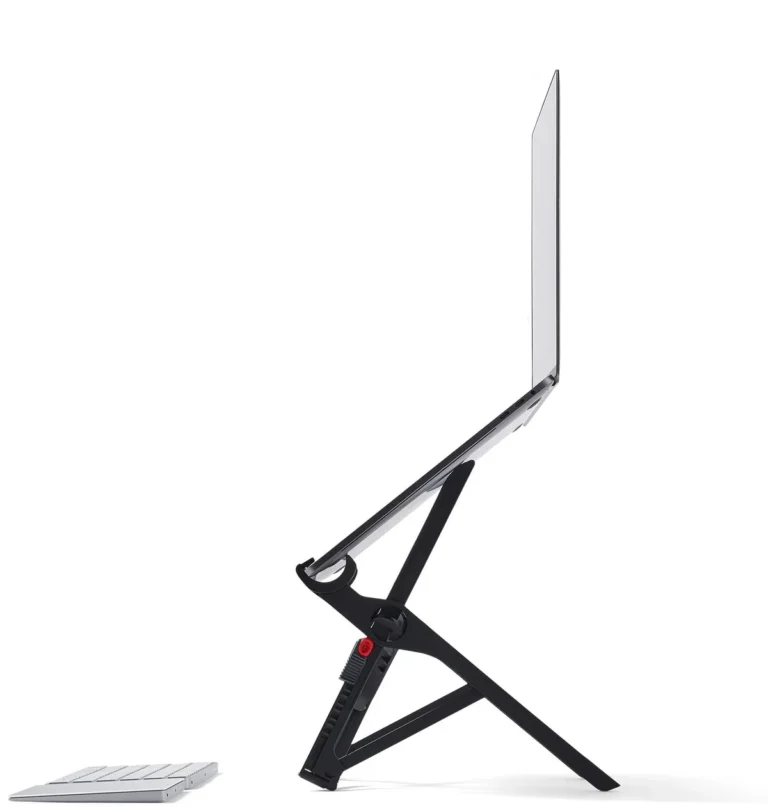
This is an informational guide. We don’t link to affiliate products here, only to our own hands-on reviews and pillar pages where you can dig deeper. Our goal is to help you set up a small-apartment workspace that actually works for an eight-hour day, without buying anything you’ll resent in six months.
TL;DR, the short version
- Minimum viable setup is smaller than you think. A 36 to 42-inch desk surface, a real chair, an external monitor, a clamp-on light, and one cable management trick. That’s the whole list.
- Prioritize ergonomics over aesthetics. The chair, the monitor height, and the lighting are what your body will feel after six months. Everything else is decoration.
- Plan for the end-of-day reset. In a small apartment, the line between “at work” and “at home” isn’t drawn by a door. It’s drawn by physical cues you set up on purpose.
What “small apartment WFH” actually looks like
Most workspace advice pictures a spare bedroom with a door that closes. That’s not the reality for most renters. This guide is for the apartment dweller whose options look more like this:
- The studio. One room. The bed, the kitchen, and the workspace share the same air. Zoning is psychological more than architectural.
- The 1-bedroom with no second bedroom for an office. The bedroom is for sleep, the living room is shared with a partner, and the WFH corner has to fit somewhere without dominating the room.
- The bedroom-corner setup. A desk wedged between the wall and the closet, sharing visual space with the bed. Workable, but the bed is in your peripheral vision all day.
- The kitchen-table worker. No dedicated furniture at all. The laptop comes out at 9 a.m. and goes back in the cabinet at 6 p.m.
Each calls for slightly different tradeoffs. The first thing to know: a small-space workspace isn’t a compromise. It’s a different design problem with real upsides. Less to clean, less to move, and a forcing function to only buy what you’ll actually use.
The 5 zones every WFH corner needs
Regardless of square footage, every functional WFH setup has the same five components. Think of them as zones, not products. You can satisfy each in several ways:
- Desk surface. Wide enough for a monitor, keyboard, mouse, and a forearm’s worth of clear space. 36 to 48 inches wide, at least 22 deep. Less and you’ll feel cramped in a week.
- Chair. The single highest-leverage purchase in the whole setup. More on this below.
- Monitor. Even one external display dramatically reduces neck and eye strain. Single 24 to 27-inch is the sweet spot for small spaces.
- Lighting. Natural light if you have it, a monitor light bar for the desk, a soft bias light behind the monitor for evenings.
- Cable management. The difference between a setup that looks intentional and one that looks like it crashed into your wall.
Notice what’s not on the list: a printer, a second monitor, a fancy webcam, a podcast mic. Those are situational. The five above are the ones that affect every WFH worker’s body and focus, every day.
Where to put it, by apartment type
Placement matters more than furniture choice. A great chair in the wrong corner still feels wrong. How we’d think through each configuration:
Studio
The single most important rule: don’t put the desk facing the bed. Working with a bed in your line of sight blurs rest and work in a way you’ll feel within weeks. Face a window or a wall. The bed should be behind you or off to the side.
For tight studios, look at narrow desks (24 to 30 inches deep, 36 to 42 wide) and use wall-mounted floating shelves for storage instead of widening the footprint. A folding screen or a tall bookshelf as a room divider gives you a small psychological boundary between work and the rest of the apartment.
1-bedroom with no spare room
Two real options: a corner of the living room or a corner of the bedroom. We lean toward the living room when possible, it preserves the bedroom as sleep-only, which most sleep researchers consider the single biggest lever for sleep quality. If a partner uses the living room while you’re in calls, the bedroom corner becomes the answer. In that case, position the desk facing a wall with the bed behind you. The visual cue alone helps the brain compartmentalize.
1-bedroom with corner of the bedroom
Same logic, plus one extra consideration: in the bedroom, the desk doubles as a clothes-pile magnet. A small basket near the desk gives laundry somewhere to land that isn’t your keyboard, and a simple desk-side hook handles jackets. Keep the work surface reserved for work things.
Kitchen-table reality
If you can’t fit a dedicated desk (or you’re WFH only one or two days a week). The kitchen table is legitimate. The honest tradeoff: kitchen chairs are almost universally bad for an eight-hour day. Add a laptop stand to bring the screen to eye level, an external keyboard and mouse so you’re not hunched, and a real chair pulled in from elsewhere if you’re WFH more than a couple of days a week.
Standing desk vs fixed desk in a small space
A sit-to-stand desk has the same floor footprint as a fixed desk. The motors don’t take extra space. So the real question is whether the standing function justifies the typical $400 to $600 price premium.
Our honest take: a standing desk earns its keep if you’ll actually use the standing function at least an hour a day. Most buyers stand for two weeks and then quietly stop. If you know yourself well enough to predict that, save the money on a great fixed desk. If you’ve used a standing desk at a previous job and missed it, the upgrade is worth it.
One small-space upside: a sit-to-stand desk lowers fully, making it easy to slide a chair underneath after hours so the room feels less work-coded. We cover the desk we recommend in our UPLIFT V2 review.
Chair: the one thing not to cheap out on
If you remember one recommendation from this guide, make it this one. The chair is what your spine sits in for forty hours a week. A bad chair shows up as low-back pain at month three and a PT referral at year one. A good chair quietly disappears.
For renters: a refurbished Herman Miller Sayl from the manufacturer’s certified store runs ~$400, meaningfully cheaper than new with the same twelve-year warranty. That’s the realistic floor for “a chair you won’t have to replace.” Anything under $200 from a no-name brand is almost certainly a chair you’ll replace within two years, and replacing twice costs more than buying once.
What to look for: adjustable seat height (feet flat, thighs parallel), a backrest that supports the lumbar curve without forcing it, armrests you can move aside, and a base that rolls on your flooring. In the $200 to $400 range, Branch and SIHOO have improved meaningfully, honest entry-level, three-to-five-year lifespan rather than twelve.
Monitor: yes, even if your laptop is great
Working off a 13 or 14-inch laptop screen for eight hours puts your neck in a chronically forward, downward-tilted posture. Even a single 24-inch external display, top of screen at eye level, dramatically reduces neck strain compared to laptop-only work.
The minimum: a single 24 to 27-inch monitor at 1440p, enough for two windows side by side without making a small apartment feel like a Bloomberg terminal. 4K is nice-to-have, not required, mostly for designers, video editors, and fine-text readers.
The under-rated simplification: a USB-C monitor that doubles as a laptop dock. One cable carries display, charging, and any peripherals plugged into the monitor’s hub. In a small apartment where every visible cable is clutter, that single-cable setup is worth a small premium.
Lighting
Lighting is the cheapest upgrade with the largest impact on how a workspace feels, and it’s the one most people skip entirely. Three layers worth thinking about:
- Natural light placement. Position the desk perpendicular to a window, not facing it (screen glare) and not backed against it (camera glare on calls). Side lighting.
- Monitor light bars. A clamp-on bar like the BenQ ScreenBar lights the desk without bouncing glare onto the screen. $100 to $190. The single best lighting upgrade for desk work.
- Bias lighting for evenings. A soft LED strip behind the monitor reduces contrast between a bright screen and a dark wall, the source of most evening eye strain. A $20 USB strip is enough.
Overhead room lighting alone is rarely enough, and a single warm lamp on the side creates as many shadows as it solves. Layer the light and the workspace feels more professional without changing anything else.
Cable + clutter management for renters
Renters need solutions that don’t require drilling or modifying the apartment. Three small pieces of gear handle 90 percent of the problem:
- An under-desk cable tray. Clamps to the underside of the desk and holds the power strip plus excess cable length. $25 to $40. Removes the visible cable nest behind the desk.
- Adhesive cord channels. Plastic raceways that stick to the wall and hide cables running to outlets. 3M Command-style adhesive removes cleanly if you do it gently.
- Removable clip-on cable management. Silicone clips that snap onto the desk edge and hold individual cables (chargers, headphones) in place.
The discipline of routing each cable once and leaving it matters more than the gear.
End-of-day reset: how to make WFH feel done
The hardest part of small-apartment WFH isn’t the workspace. It’s making the workday end. Without the commute or the office door closing, the brain doesn’t get the cue that work is over. Build the cue manually.
The simplest version is a three-step physical ritual: close the laptop, turn the monitor off, turn off the desk light. Three small actions, same order, every day. After about two weeks, the brain starts associating that sequence with “done.”
A time boundary helps too. Pick an end-of-day time and treat it as non-negotiable for the first month. The default with WFH is for work to expand to fill all available hours; the fix is to decide when it ends. Even in a studio, a dedicated zone helps, leaving the desk corner for the couch eight feet away is still a real psychological transition.
When to invest in a real desk vs use the kitchen table
The honest tipping point is around twenty hours a week of WFH. Below that, the kitchen table plus a laptop stand and a decent chair pulled in from elsewhere is genuinely fine. Above twenty hours, the daily setup-and-teardown friction plus the ergonomic cost of working at the wrong height adds up. Three signals it’s time to commit:
- You’re skipping meals at home because the work spread on the table makes setting up dinner annoying.
- You’re noticing low-back, neck, or wrist pain that wasn’t there a few months ago.
- You’re WFH at least three days a week and have been for at least three months, meaning this isn’t a temporary arrangement you’re going to revisit.
If two of those three are true, a dedicated setup pays back faster than most people expect, not in dollars, but in how the apartment functions when you’re not working.
Where to read our hands-on takes
This guide is intentionally product-light. The best small-apartment WFH advice is mostly about layout and habits, not hardware. When you’re ready to look at specific gear, we’ve gone deep on the pieces we recommend most often:
- Our full UPLIFT V2 standing desk review. The desk we’d buy if we were buying today, plus the case for skipping it.
- Our Logitech MX Master 3S review, the productivity mouse worth the price for daily WFH.
- The best WFH desk setup under $1,500, a complete build with budget breakdowns.
- The full Workspace pillar, everything we’ve published on building a small-space WFH setup that lasts.
Is a standing desk worth it for a studio apartment?
Only if you’ll actually stand at it. A sit-to-stand desk takes the same floor footprint as a fixed desk, so space isn’t the issue. Cost is. Plan to spend $400 to $600 more than a comparable fixed desk. If you’ve used one before and missed it, yes. If this would be your first standing desk, be honest about whether you’ll use the standing function past the first month.
Can I deduct a WFH setup on my taxes?
If you’re a W-2 employee in the U.S., generally no. The home office deduction was eliminated for employees by the 2017 tax reform and remains so as of 2026. If you’re self-employed or a 1099 contractor, the home office deduction still applies for a space used regularly and exclusively for work. We’re not tax advisors; check with one before claiming anything.
What’s the best lighting for video calls?
The cheapest meaningful upgrade is positioning your desk so a window is to the side, not behind you. Backlight from a window turns you into a silhouette on every call. If you don’t have good window placement, a soft-light panel or a ring light at face height (not above the monitor) gives even, flattering coverage. Avoid overhead lighting alone; it casts shadows under the eyes.
How do I deal with noise from roommates or a partner?
Layered: closed-back over-ear headphones with active noise cancellation, a white noise machine or fan for ambient masking, and an honest conversation about call schedules with the people you live with. No amount of gear replaces the conversation. For unavoidable shared rooms, scheduling focus-heavy work for the hours when the apartment is empty is often the only real fix.
Should I get a real chair if I only WFH two days a week?
Probably yes, but you don’t need the top-tier option. A used Herman Miller from a secondhand marketplace or a $200 to $300 mesh chair from Branch or SIHOO is the right tier at two days a week. The reason: a kitchen chair is genuinely bad for an eight-hour day, and back pain doesn’t care whether you’re WFH twice or five times a week. The same posture for the same hours produces the same results.
Do I need an external monitor if my laptop screen is fine?
For full-time WFH, yes. The issue isn’t screen quality. It’s angle. A laptop screen sits below eye level, forcing your neck into a downward tilt all day. That posture is the source of most WFH neck and upper-back pain. A single external monitor at the right height fixes it. If you’re part-time and already using a laptop stand with an external keyboard, you can get away without one, but for full-time desk workers it’s the single most impactful upgrade.
We refresh our guides as our hands-on testing and pricing in the market shift.
Frequently asked questions
Is a standing desk worth it for a studio apartment?
Only if you'll actually stand at it. A sit-to-stand desk takes the same floor footprint as a fixed desk, so space isn't the issue, cost is. Plan to spend $400 to $600 more than a comparable fixed desk. If you've used one before and missed it, yes. If this would be your first standing desk, be honest about whether you'll use the standing function past the first month.
Can I deduct a WFH setup on my taxes?
If you're a W-2 employee in the U.S., generally no. The home office deduction was eliminated for employees by the 2017 tax reform and remains so as of 2026. If you're self-employed or a 1099 contractor, the home office deduction still applies for a space used regularly and exclusively for work. We're not tax advisors; check with one before claiming anything.
What's the best lighting for video calls?
The cheapest meaningful upgrade is positioning your desk so a window is to the side, not behind you. Backlight from a window turns you into a silhouette on every call. If you don't have good window placement, a soft-light panel or a ring light at face height (not above the monitor) gives even, flattering coverage. Avoid overhead lighting alone; it casts shadows under the eyes.
How do I deal with noise from roommates or a partner?
The realistic answer is layered: closed-back over-ear headphones with active noise cancellation for the worst of it, a white noise machine or a fan for ambient masking, and an honest conversation about call schedules so the people you live with know when you genuinely need quiet. No amount of gear replaces the conversation. For unavoidable shared rooms, scheduling your most focus-heavy work for the hours when the apartment is empty is often the only real fix.
Should I get a real chair if I only WFH two days a week?
Probably yes, but you don't need the top-tier option. A used Herman Miller from a secondhand marketplace or a $200 to $300 mesh chair from Branch or SIHOO is the right tier at two days a week. A kitchen chair is genuinely bad for an eight-hour day, and back pain doesn't care whether you're WFH twice or five times a week. The same posture for the same hours produces the same results.
Do I need an external monitor if my laptop screen is fine?
For full-time WFH, yes. The issue isn't screen quality, it's the angle. A laptop screen sits below eye level, which forces your neck into a downward tilt for most of the workday. That posture is the source of most WFH neck and upper-back pain. A single external monitor at the right height fixes the problem more effectively than any laptop stand. If you're WFH part-time and using a laptop stand with an external keyboard, you can get away without one, but the upgrade is the single most impactful change for full-time desk workers.