

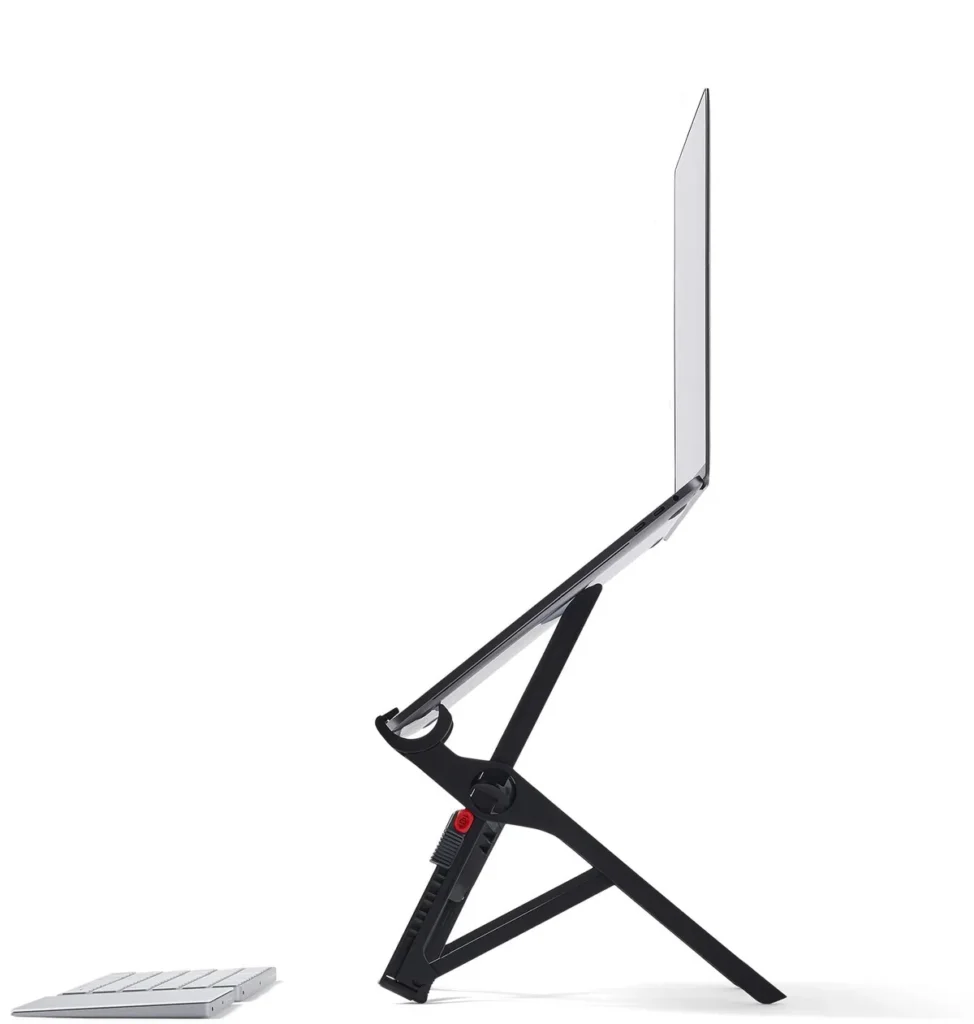
Roost V3 Laptop Stand Review (2026): The Portable Ergonomic Pick
The right laptop stand for the WFH-mobile crowd. 6.4 oz folded to magazine-roll size, 15-second deploy, stable at max height. Skip if your laptop lives at one desk 90% of the time ($30 Soundance does the job). Budget for an external keyboard + mouse to pair with it.

Pros
- 6.4 oz weight and 1.5 inch folded profile lives in your bag (not at the desk)
- 15-second deploy and breakdown, no tools or fiddly parts
- Stable at max height even for 16 inch laptops (the 2023 base redesign fixed the wobble)
- Cable-clear underside lets you route USB-C hubs underneath
- Six height positions cover 5 ft 4 to 6 ft 5 user range
Cons
- $89.95 is hard to justify if laptop lives at one desk 90% of the time
- Requires an external keyboard + mouse for the actual ergonomic benefit (+$80 to $220)
- 13-16 inch laptop range only (excludes 11-12 inch ultraportables and 17 inch gaming laptops)
- Full mobile setup (stand + keyboard + mouse) adds meaningful weight to a daily bag
Some links on this page are affiliate links. If you buy through them I may earn a commission at no extra cost to you. I bought the Roost V3 with my own money and have used it almost daily for about a year. This is my honest take after living with it.
I’ll be straight: the price almost stopped me. Ninety dollars for what is basically a folding aluminum stick felt absurd, and I sat on the decision for a while. I bought it because I was hunched over a laptop on a kitchen table and my neck was paying for it by mid-afternoon. About a year later, it’s the piece of my setup I’d replace fastest if it broke, and I’ve stopped thinking about the price.
What it actually does
It raises the screen to eye level, and that’s the whole point. The Roost lifts the laptop up to about 14 inches across seven height settings, so the top of the screen sits where my eyes naturally look instead of forcing my head down. The mid-afternoon neck ache I’d just accepted as part of laptop work was gone within the first week and hasn’t come back.
It also packs down to nothing. Folded, it’s a thin stick about 13 inches long and lighter than my phone, and it disappears into the side pocket of my bag. I’ve carried it between rooms, to coffee shops, and on trips without once thinking about the weight.
And it pops open in about two seconds, no latches or screws, faster than opening the laptop itself. Once the laptop is clipped in it does not move. The rubber grips lock it in place with no wobble, even if I bump the desk. For something this light, the stability is the part that still surprises me.
Check current Roost price on Amazon →
The catches
You can’t type on the laptop’s own keyboard while it’s up there. The whole point is that the screen is lifted away from you, so you need an external keyboard and mouse to actually work at it. If you don’t already own those, factor that in, because the Roost on its own is half a setup.
It also needs a flat, stable surface. This is a desk-and-table tool, not a lap desk, and it’s useless on a wobbly airplane tray. And the price only makes sense if eye-level ergonomics genuinely matter to you. The Nexstand does most of the same job for about a third of the cost. The Roost earns the gap on how small it packs, how fast it deploys, and how solid it feels, and if those don’t move you, save your money.
A year in
This is where it justified the price for me. After about a year of near-daily folding and unfolding, the hinges are as snappy as the day I got it, nothing has loosened, and the finish still looks new. Owners who’ve had theirs for five-plus years report the same, which is rare for anything with moving parts you handle every day.
Who it’s for
Buy it if you work on a laptop away from a fixed monitor, especially if you move between spots or travel, and you already run an external keyboard and mouse. Skip it if you sit at one desk all day (a cheaper fixed stand or a real monitor does more for less), if you rarely leave home, or if you want a surface you can also type on directly.
Bottom line
A year in, the Roost V3 is an easy recommendation despite the price. It fixed my neck, it weighs nothing, and it has held up without a hint of wear. Pair it with a compact keyboard and mouse and you’ve got a genuinely portable ergonomic setup.
If you’re building out the rest of the workspace, our best WFH desk setup under $1,500 guide covers the keyboard, mouse, and monitor that pair with it.